Your Jira already knows more than you think.

Your existing data doesn't have to be perfect: detailed history, automatically interpreted.

Recadence, recorded from the product: five epics shown as total working days spent, which spread out into a timeline of short stretches of work, queues and one long pause, which the pointer rests on while the film asks why; one epic opens into the three tickets that drove it, and its timeline is visibly made of theirs; pressing the paused stretch on one ticket opens its full status history (a day and a half in development, then three weeks reverted back to a TODO status before it was picked up, reviewed, tested and released).

See your last quarter in 5 minutes

Get clarity over how the work actually gets delivered.

DeliveryWhere the work waited

QualityWhat it cost to get it right

PlanningWhether the plan was ever real

What you're asked forWhat you hand to someone else

Start free trial
  • Automatically adapts to you
  • Your teams can use it within Jira
  • A read-only Jira user is all it needs

How clarity helps teams improve.

100+ behavioural signals, checked automatically and ready to discuss.

Step 1. See it: Identify the smallest improvements with the biggest impact.

If the coding is fast, why does a ticket still take multiple sprints?
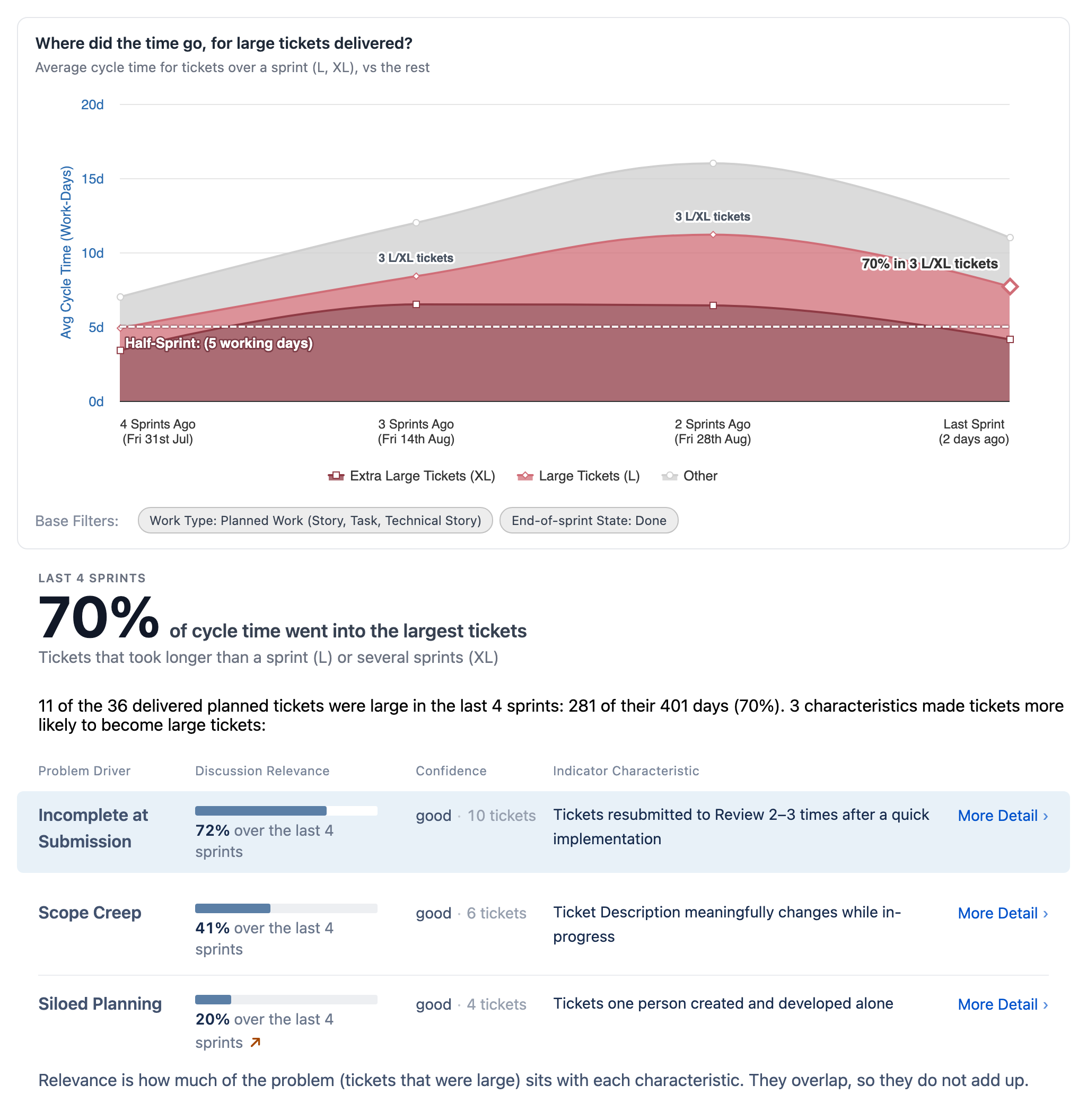
The Why surface's planning chart for one team, with its findings table beneath. The chart is average cycle time per sprint over four sprints, the large and extra-large tickets banded out in two reds from everything else in grey, with a half-sprint benchmark line and a label on the latest sprint saying what share of it sat in how many large tickets. Two chips under the chart state the scope it covers: planned work, listing the ticket types it counts, and end-of-sprint state Done. Under the chart a stat block states the window, the share of cycle time that went into the largest tickets, and what counts as large: longer than a sprint, or several sprints. Under that, an opening sentence counts the large tickets and their days, then three candidate characteristics, each carrying its family, a bar and a percentage for the share of the problem it accounts for, a confidence word with the number of tickets behind it, and a link to more detail; the top row is tickets resubmitted to review two to three times after a quick implementation, filed under a family called incomplete at submission, and the three rows descend in share from it: next a ticket description changing meaningfully while in progress, filed under scope creep, then tickets one person created and developed alone, filed under siloed planning.
What's happening in this picture?

Past behaviour is the best predictor of future performance. If an issue has dominated cycle time for the last four sprints, it will probably dominate the next few as well. Recadence spots the symptoms of common problems and backs them with statistically significant evidence, giving teams a credible starting point for discussion. Because the focus is on improving the next sprint rather than assigning blame for the last one, conversations stay constructive. In this example, 70% of cycle time went into the largest tickets, making them the highest-leverage place to start. Tickets that went back to review after a quick implementation were disproportionately the large ones, so Recadence recommends raising this with the team.
Step 2. Prove it: Nothing you have to take on trust.

For these tickets, was the time spent in development, or something else?

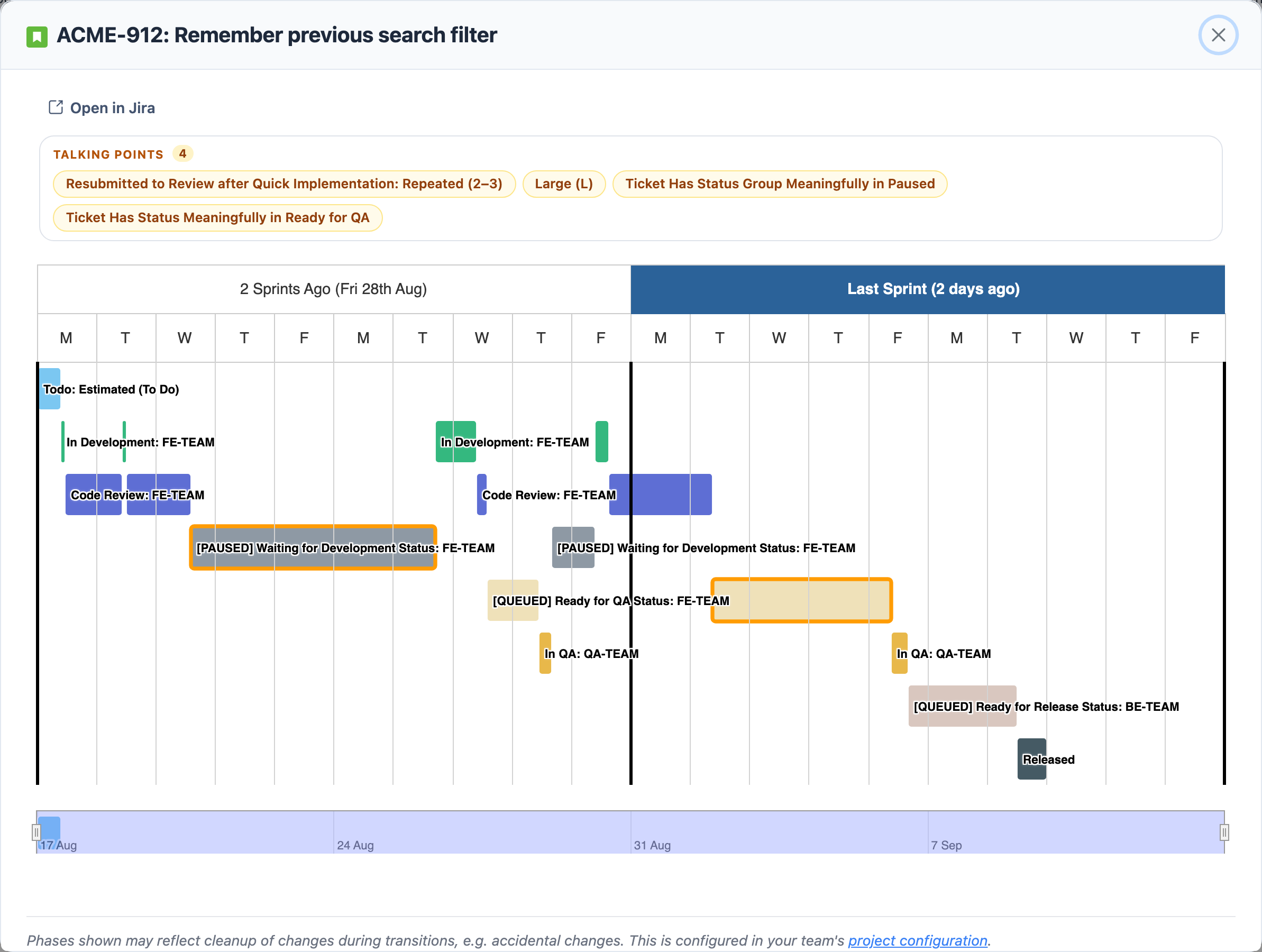
One ticket's timeline in the product's dialog, titled with its key and summary, an Open in Jira link, and four talking-point chips above the chart: resubmitted to review after quick implementation, repeated two to three times, then large, status group meaningfully in paused, and status meaningfully in ready for QA. Two sprints run across the top, the latest highlighted. A short pale-blue To Do row opens the chart, labelled estimated. Below it four short green In Development bars alternate with four blue Code Review bars, and two wide bars carry the product's amber dashed outline: a paused Waiting for Development bar of four days in the earlier sprint, and a three-day Ready for QA queue in the latest. Two short In QA bars, a ready-to-deploy wait and the release marker close it in the latest sprint's second week.
What's happening in this picture?

Seeing the story of what actually happened is essential to a productive discussion. Nobody can reasonably be expected to remember the detailed timeline of dozens of tickets passed back and forth between people. Once the team agrees on what the problem was, they can focus on the trade-offs of what to do about it. This Gantt chart shows different statuses and which roles in the team were assigned to each status, from start to completion.

Step 3. Scale it: Deep integration inside the Jira your team already uses.

Could a team’s retrospective find this pattern, and fix it?

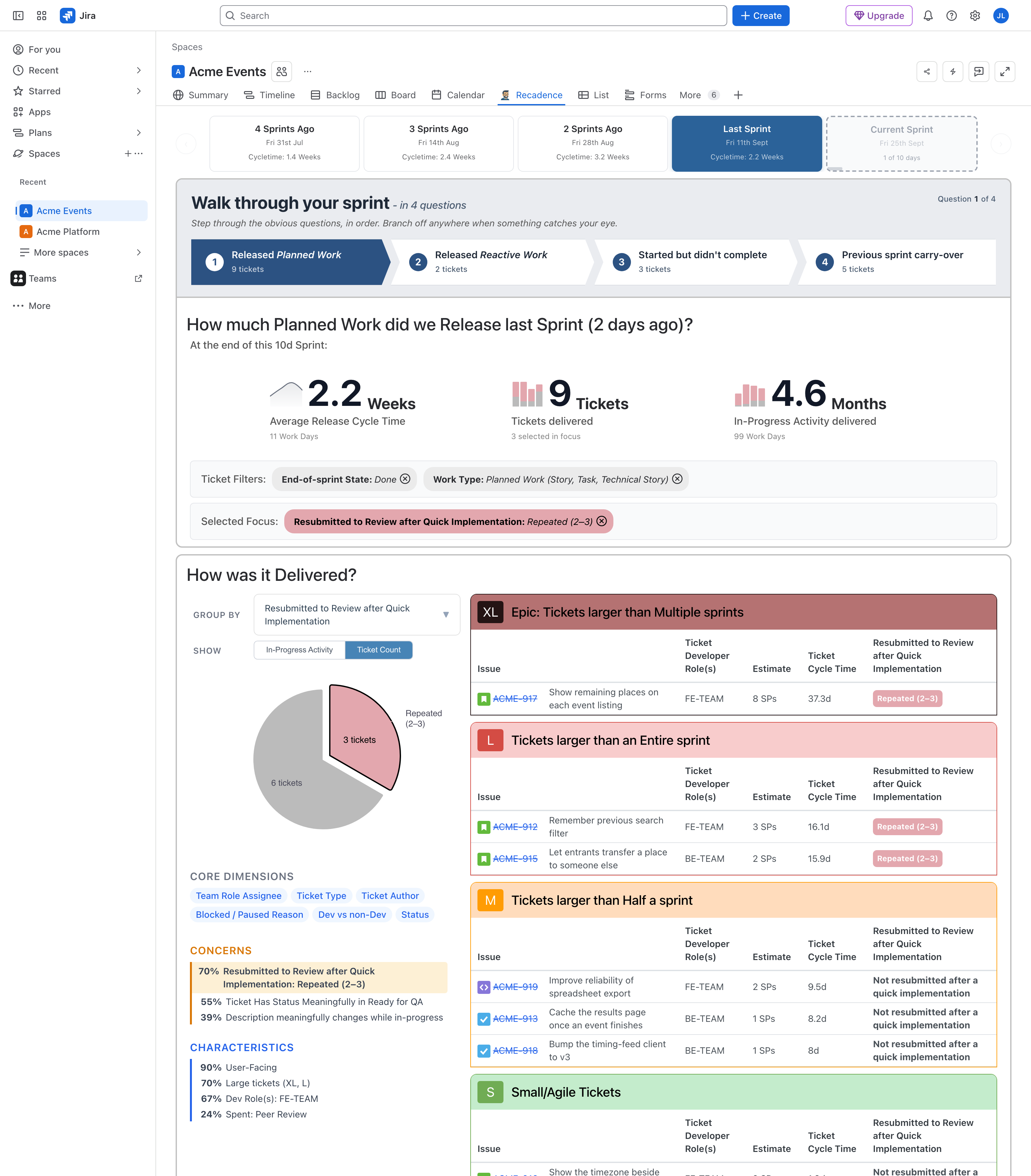
The Recadence tab open inside a Jira project page called Acme Events, beside Summary, Timeline, Backlog, Board and Calendar. A strip of five sprints runs across the top of the app: four sprints ago at 1.4 weeks of cycle time, three ago at 2.4, two ago at 3.2, last sprint at 2.2 and selected, and the current sprint one day of ten in. Below it a four-question walkthrough of the sprint, on question one: 9 tickets of planned work released, 2 of reactive work, 3 started and not finished and 5 carried over from earlier sprints. Three headline figures follow — 2.2 weeks average release cycle time over 11 work days, 9 tickets delivered with 3 of them selected in focus, and 4.6 months of in-progress activity across 99 work days. The two counting figures each carry a small four-sprint bar chart with the focused tickets filled in dusty rose against the rest in grey. Then two chips stating the scope they cover, end-of-sprint state Done and work type planned work listing the same three ticket types the first picture lists, and a selected focus: resubmitted to review after quick implementation, repeated two to three times. The lower half is grouped by that same finding. A pie counting tickets splits the sprint 3 against 6, the three tagged in dusty rose. Beneath it a list the product wrote without being asked: under CONCERNS, that same resubmission finding at 70 per cent and highlighted as the one in view, a meaningful wait in Ready for QA at 55, and a description changing mid-flight at 39; under CHARACTERISTICS, user-facing work at 90 per cent, large tickets at 70, the front-end team at 67, and a quarter of the sprint spent in peer review. To the right the same nine tickets as a table banded by size, each row carrying its key, its team, its estimate, its own cycle time and whether it was resubmitted after a quick implementation: ACME-917, show remaining places on each event listing, 8 points and 37.3 days, tagged; ACME-912, remember previous search filter, 3 points and 16.1 days, tagged; ACME-915, let entrants transfer a place to someone else, 2 points and 15.9 days, tagged; then three tickets larger than half a sprint that were not, one of them a technical story about spreadsheet export; and the small tickets continuing past the bottom of the frame.
What's happening in this picture?

Recadence helps managers identify high-level issues that require intervention, while detailed optimisation is left to the team, for example in their retrospectives. At that level of detail, hidden knowledge is unevenly spread even within a team, let alone outside it. Giving teams clear risk thresholds and the tools to understand what is happening and why empowers them to improve measurable goals in small, agile increments.

See it yourself in 5 minutes. Then hand the same view to the team.

Start free trial

Automatically adapts to you

Nothing to reconfigure and no process to adopt, whether you run Scrum, Kanban or neither. It maps your statuses and asks you to check them, so you're looking at last quarter on day one.

Your teams can use it within Jira

Available on the Jira ticket, and from the board and backlog menus. No external tool, no second login.

A read-only Jira user is all it needs

That's the whole integration. Nothing to expose your code to, and no infrastructure to upgrade.